

Agenda
Agenda – July 1, 2026, D4 Business Meeting
Meeting Overview
- Group: District 04, MSCA 09, Panel 76 Business Meeting
- Date & Time: Wednesday, July 01, 2026, from 7:00 p.m. to 8:30 p.m.
- Platform: Zoom (ID: 996 5396 0080 / Password: 673617)
Schedule & Order of Business
7:00 p.m. – Opening & Welcome
- Opening: Serenity Prayer led by Marissa and Patrick.
- Welcome: Greeting guests, visitors, and General Service Representatives (GSRs).
7:05 p.m. – Readings & Elections
- Readings: GSR Preamble and the Concept VII Checklist.
- Election: Voting for a new Secretary.
7:15 p.m. – Review & Approvals
- Approval of the minutes from the previous meeting held on June 3, 2026.
7:20 p.m. – 7:40 p.m. – Area Updates & Officer Reports
- DCMC (Titus D.): Discussing upcoming events and the June Area Service Committee (ASC) highlights regarding the printer, website, CPC, finance, and GSR school.
- AltDCMC (Sam): Absent.
- Registrar (Marilyn): Welcoming new GSRs and sharing details on registration and the Service Manual.
- Treasurer (Kim S.): Financial report.
- Committee/DCM Reports: Briefings from various regional districts (SE, NE, NW) and specific committees (including GSR School, Finance, PI, CPC, LGBTQ, Website, and YPAA).
7:40 p.m. – 8:30 p.m. – Closing Business
- Old Business (7:40): Calling for anyone standing for an open committee chair or DCM position.
- New Business (7:50): Open floor for new items (Note: the strict deadline for submitting new agenda items was the 15th).
- AA Birthdays (8:25): Celebrating milestones.
- Closing (8:30): Reciting the AA Responsibility Statement.
June 3, 2026, D4 Business Meeting Agenda + Slides
AGENDA
District 04, MSCA 09, Panel 76 Business Meeting
Wednesday, June 03 2026 @ 7:00-8:30 p.m.
Meeting Link: JOIN HERE
Zoom ID: 996 5396 0080
Password: 673617
Opening: 7:00 | Serenity Prayer | ||
Welcome: 7:00 | Guests, Visitors, and GSRs | ||
Readings: 7:05 | GSR Preamble Concept VI Checklist | ||
Review/Approve: 7:15 | 05-06-26 Minutes https://www.longbeachaa.org/may-6- 2026-business-meeting-minutes/ | ||
MSCA Area 09 Updates and Officer’s Reports: 7:20 – 7:40 | DCMC, Titus D: * Area 09 Delegate Shareback Resources AltDCMC, Sam: * Resource Sharing Secretary, Don: * Upcoming events Registrar, Marilyn: * Welcome new GSRS * Provide info about registration and Service manual Treasurer, Kim S: | ||
Area 09 Delegate Shareback Summary | * Debra & ShareBack Resources https://msca09aa.org/general-service-conference-2/gsc2025-75th-gsc-materials/ | ||
DCM/ Committee Reports | SE – Laura SW – Jill NE – Jessica NW M – Wes W – Leslie MP- Marissa LGBTQ++ -Chandler Rs/LA – JohnB | * GSR School – Angela * Finance Comm – Jim * PI – John * Literature – * LGBTQ – Kaitlin * Website – Matthew, Patrick * Grapevina/LaVina | * Corrections * CPC – Greg J * Archives * Accessibility * H&I * Harbor Area Rep * YPAA – Marissa |
Old Business: 7:40- 7:50 | * Anyone standing for committee chair or DCM? | ||
New Business: 7:50- 8:25 | * Deadline for New Business in Agenda is 15th. | ||
AA Birthdays: 8:25 | |||
Closing: 8:30 | AA Responsibility Statement | ||
Slides
May 6, 2026, Business Meeting Agenda & Slides
View this PDF as a Full Screen Document
Click/Tap the Prentation Mode Button/Menu Item
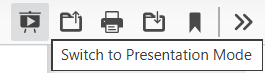
On a larger display, such as a desktop, the toolbar displays some buttons, and the first is “Presentation Mode”. When you hover your mouse over it, a tooltip displays, “Switch to Presentation Mode”. Click the button for a full screen display.
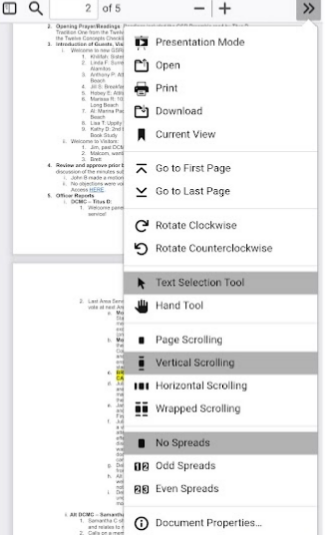
On a smaller display, such as a mobile phone, the buttons will not display. However, tap the [>>] to open the menu, then tap “Presentation Mode” – the first option.
Agenda + Slides for April 1, 2026, D4/MSCA09 Business Meeting
View this PDF as a Full Screen Document
Click/Tap the Prentation Mode Button/Menu Item
On a larger display, such as a desktop, the toolbar displays some buttons, and the first is “Presentation Mode”. When you hover your mouse over it, a tooltip displays, “Switch to Presentation Mode”. Click the button for a full screen display.
On a smaller display, such as a mobile phone, the buttons will not display. However, tap the [>>] to open the menu, then tap “Presentation Mode” – the first option.
March 4, 2026, D4 Business Meeting Agenda
View this PDF as a Full Screen Document
Click/Tap the Prentation Mode Button/Menu Item
On a larger display, such as a desktop, the toolbar displays some buttons, and the first is “Presentation Mode”. When you hover your mouse over it, a tooltip displays, “Switch to Presentation Mode”. Click the button for a full screen display.
On a smaller display, such as a mobile phone, the buttons will not display. However, tap the [>>] to open the menu, then tap “Presentation Mode” – the first option.